
How to Make Friends Online Through Random Video Calls
Meet people through random video calls using interest matching, face blur and virtual backgrounds, plus moderation tips to build safe, genuine friendships.
Random video calls offer a pressure-free way to meet new people without maintaining a polished online persona. Platforms like Glimr facilitate this through interest-based matching, privacy controls including face blurring, and strict moderation policies. Whether expanding your social circle or having casual chats, Glimr provides straightforward connection methods.
Key Highlights:
- Ease of Use: No account needed; just click "Start" to begin chatting.
- Privacy Features: Tools like face blurring and virtual backgrounds protect your identity.
- Safety Measures: AI moderation and an 18+ age rule ensure a secure experience.
- Engaging Conversations: Use open-ended questions and shared interests to build connections.
Why Use Glimr for Random Video Chats
Glimr removes typical online interaction barriers. You don't need accounts, profiles, or followers to connect. This straightforward setup protects privacy while avoiding personal information sharing requirements.
The platform enforces strict 18+ age rules, creating spaces for mature, genuine conversations. According to community guidance, anonymity helps users feel comfortable being themselves, enabling connections without maintaining social media personas.
Privacy tools like face blurring and virtual backgrounds give you appearance control. Glimr employs AI moderation combined with human oversight filtering inappropriate behavior—an improvement over earlier platforms like Omegle, which previously attracted around 6.5 million monthly unique users before facing moderation issues.
Interest-based matching connects you with people sharing your passions, whether hiking, classical music, or vintage cars, transforming random chats into meaningful interactions.
Glimr vs. Other Platforms
| Feature | Glimr | Chatroulette | OmeTV | Emerald Chat |
|---|---|---|---|---|
| Account Required | No | No | Often requires app/social login | Account-based options available |
| Moderation | AI + Human Review | AI-powered filtering | AI-powered systems | Karma-based reporting |
| Age Requirement | 18+ enforced | 18+ stated | 18+ stated | 18+ stated |
| Matching Options | Interest, Gender, Region filters | Primarily random | Random and Regional | Interest-based and Group chat |
| Privacy Features | Face blurring, virtual backgrounds | Reporting tools | Reporting tools, AI filtering | Interest matching, Karma system |
| Cost | Free | Free with premium options | Free with premium options | Free with premium options |
Glimr stands out combining anonymity, strict age enforcement, and advanced privacy tools, making it ideal for turning casual chats into meaningful connections.
How to Prepare for Better Conversations on Glimr
Preparation enhances both enjoyment and security. Before starting chats, organize your space and decide what you're comfortable sharing.
Technical Setup
Reliable internet connections ensure smooth, uninterrupted chats. Test your device's webcam and microphone beforehand. When browsers request camera and microphone access, click "Allow."
Lighting significantly impacts first impressions. Position yourself facing windows for natural light or use soft indoor lighting without harsh shadows. Find quiet spaces with clean, neutral backgrounds. Avoid revealing personal items like mail or diplomas that could expose private details.
Keep your username or handle generic. Do not include your first and last name.
Setting Personal Boundaries
Establishing boundaries is essential. Avoid sharing sensitive details like location, full names, workplaces, or financial information early in conversations. Consider waiting until you've built trust, potentially requiring at least an hour of chatting.
Familiarize yourself with "Stop" or "Next" buttons before starting. If someone makes you uncomfortable or behaves inappropriately, disconnect without explanation obligations.
If somebody else has contacted you or is overly aggressive, block them or avoid contact with them. You can leave the chat room if you feel intimidated or threatened.
Dress in ways making you feel comfortable and confident—it sets conversation tones appropriately.
5 Steps to Making Friends on Glimr
Making friends on Glimr involves being open and genuine. The platform's simple setup enables focusing on meaningful conversations, transforming random matches into real connections.
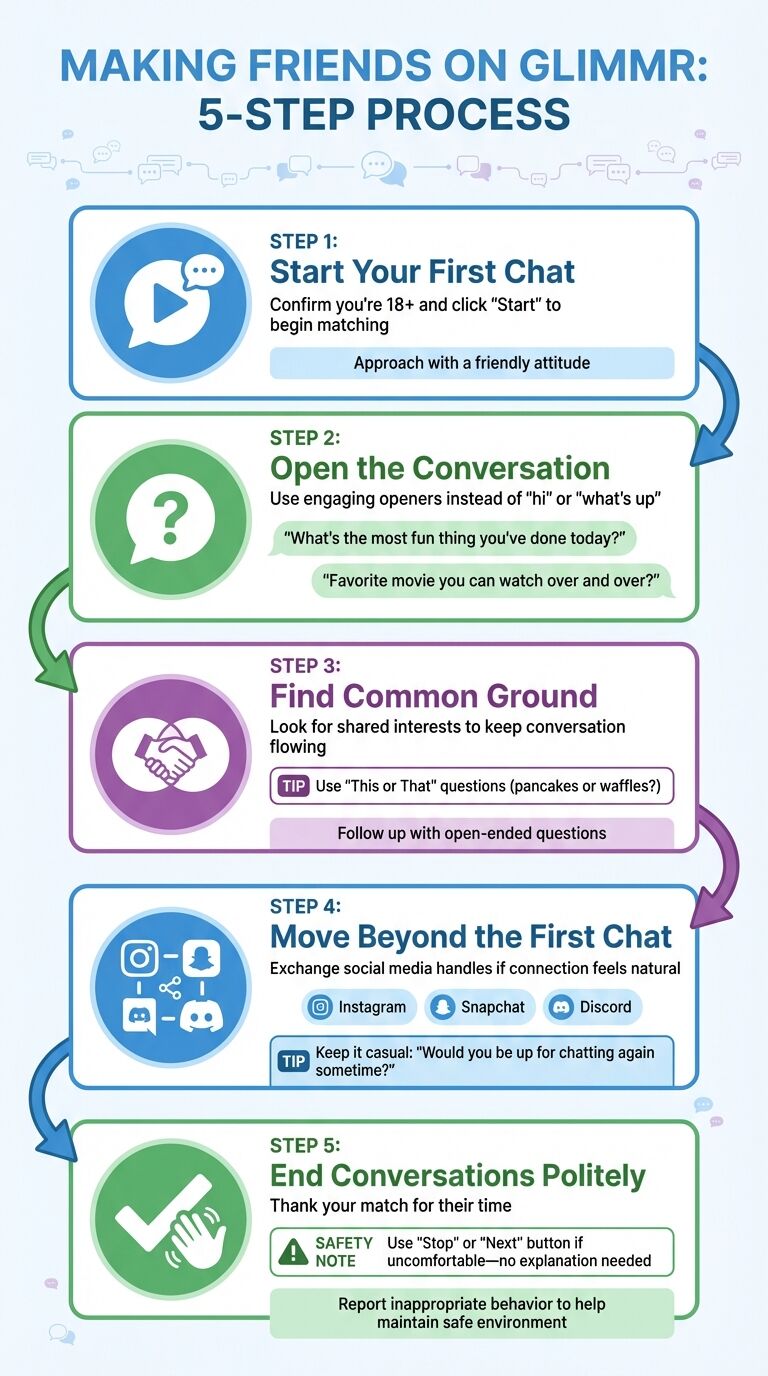
Step 1: Start Your First Chat
Getting started is easy. After confirming you're over 18, click "Start" to begin matching. Approach chats with friendly attitudes—your tone and openness set positive interaction stages.
Step 2: Open the Conversation
Avoid generic openers like "hi" or "what's up." Try engaging questions like "What's the most fun thing you've done today?" or "Do you have a favorite movie you can watch over and over?" These show interest beyond surface-level chatter and encourage thoughtful responses.
Step 3: Find Common Ground
While chatting, identify shared interests keeping conversations flowing. Use lighthearted "This or That" questions like "pancakes or waffles?" to quickly pinpoint mutual likes. Follow up with open-ended questions inviting stories rather than simple yes-or-no answers. Research suggests meaningful conversations with genuine self-disclosure boost overall well-being. Inject humor—it reveals personality alignment.
Step 4: Move Beyond the First Chat
When connections feel natural, consider extending conversations to other platforms. After sufficient interaction, exchange social media handles like Instagram, Snapchat, or Discord. Keep it casual: "Would you be up for chatting again sometime? No pressure!" Before sharing usernames, check profile authenticity.
If you've had a good conversation, consider exchanging usernames or adding each other on social media. This helps build continuity and deepens the connection.
Step 5: End Conversations Politely
Not every chat leads to friendship—that's okay. Wrap up positively by thanking matches for their time. If conversations turn uncomfortable or inappropriate, use "Stop" or "Next" buttons immediately without explanation obligations. Reporting inappropriate users helps maintain safe, welcoming environments.
Conversation Strategies That Work
These strategies fine-tune approaches to creating engaging, meaningful dialogue. Great Glimr chats rely on showing genuine interest and fostering natural back-and-forth flows. Balancing curiosity about others with sharing about yourself keeps conversations alive. Research indicates people often overestimate talking-to-strangers awkwardness—breathe, relax, let things unfold naturally.
Conversation Starter Examples
Skip generic greetings; aim for open-ended questions encouraging real responses. Narrow topics to specific areas like "classical musicals" rather than broad "movies" to find common ground and spark deeper discussions.
| Starter Type | Example Question | When to Use |
|---|---|---|
| Icebreaker | "Hey, how has your day been so far?" | To start casual, low-pressure chats |
| Hobby-Focused | "What is a song that is your total guilty pleasure?" | To connect over pop culture or shared tastes |
| Hypothetical | "If your day suddenly freed up, what would you do?" | To steer chats toward personal values |
| Environmental | "I love that [item] in your background; what's the story behind it?" | When noticing interesting video feed elements |
| Future-Oriented | "When is your next big adventure or vacation?" | To set upbeat, positive tones |
Another effective approach involves using surroundings for inspiration—a technique called triangulation. Noticing and commenting on environmental elements creates easy, shared connection points.
How to Keep Conversations Going
Active listening sustains great conversations. When someone shares something, follow up with thoughtful questions showing engagement. A helpful guideline is the 3:1 ratio: for every three questions asked, share one interesting fact or story about yourself. This prevents chats feeling like interrogations.
Matching others' energy is crucial. Mirror their tone, pace, and message length. After they finish speaking, pause briefly before responding—this demonstrates processing their words rather than waiting for turns.
If conversations slow, don't worry. Pauses are natural. Acknowledge them with humor.
No matter how good you are at talking, awkward silences are bound to happen... accept the pauses as part of the conversation.
Another technique is the Ping Pong Method: end statements with "How about you?" to keep dialogue bouncing back and forth.
Humor keeps things light and tests compatibility. Just avoid sensitive topics until building trust. Ultimately, stay present, curious, and enjoy knowing the person you're talking with.
How to Stay Safe on Glimr
Once you've mastered starting conversations, safety remains equally important. Glimr connects you with new people and builds connections, but mindfulness about privacy ensures positive interactions. While platforms have safeguards, your awareness plays major roles in fun, secure experiences.
Glimr's Safety Features
Glimr uses AI-powered moderation filtering inappropriate content in real time. This system works silently catching and addressing problems before escalation. The platform's reporting system lets users flag issues instantly.
Privacy forms Glimr's design core. You can stay anonymous using pseudonyms instead of real names. Tools like face blurring, virtual masks, and avatars enable interacting while keeping identities private. Virtual backgrounds hide surroundings, and all calls and messages are protected with end-to-end encryption. Not ready for video? Start with text-based chats easing into experiences.
How to Avoid Common Risks
Despite Glimr's safety measures, precautions matter. Avoid sharing personal details like full names, addresses, phone numbers, or workplaces until trusting someone. Consider using reliable VPNs and position cameras against plain walls or use virtual backgrounds keeping environments private.
If conversations become uncomfortable, use the Stop button ending chats immediately. Watch for red flags like fake or pre-recorded webcam streams, money requests, or personal information pressure. Real-time interactions typically indicate authenticity. If someone crosses boundaries, disconnect and report them through Glimr's built-in tools.
Safety Features: Glimr vs. Competitors
| Platform | Key Safety Features |
|---|---|
| Glimr | AI moderation, face blurring, virtual backgrounds, reporting/blocking, encryption, ephemeral messaging |
| Emerald Chat | Interest-based matching, reporting tools, text or voice-only chat for anonymity |
| Bazoocam | Basic moderation and reporting system |
| Camsurf | User reporting and basic content filtering |
Glimr leads a new platform wave prioritizing AI-driven safety features over manual moderation. While no system is foolproof, combining these tools with smart personal habits gives you the best safety chances while enjoying the platform.
Conclusion
Building friendships through video calls starts with the right approaches and tools. Glimr offers platforms designed for safe, meaningful connections featuring AI-powered moderation, interest-based matching, and strong privacy measures.
To begin, use engaging icebreakers, listen attentively, and focus on finding shared interests. Friendship formation hinges on mutual respect and understanding.
The outlined strategies work by balancing spontaneity and security. Video calls provide unique advantages by allowing you to pick up on visual cues—like facial expressions and body language—speeding bonding processes. When paired with clear boundaries and gradual sharing, these interactions create environments where genuine relationships grow. Glimr leverages these strengths enabling spontaneous yet secure connections.
With these techniques, one thing becomes clear: differences between quick chats and lasting friendships often lie in efforts to follow up, go deeper than surface-level topics, and show real curiosity about other people. By consistently using these approaches, you can transform casual conversations into meaningful, lasting friendships.
FAQs
How does Glimr protect my privacy during video calls?
Glimr prioritizes user privacy, implementing measures ensuring safe, secure video call experiences. These include advanced moderation tools, user reporting options, and customizable controls letting you decide who can connect with you.
To safeguard personal information, Glimr uses encryption technology, adding extra protection layers to your data.
Additionally, features like interest-based matching and regional filters help form meaningful connections while reducing inappropriate interaction chances. Glimr's goal involves creating secure spaces building genuine friendships without privacy concerns.
How can I get ready for a video chat on Glimr?
To have smooth, enjoyable Glimr video chats, start by setting up in quiet, well-lit spaces with tidy backgrounds. Clutter-free environments reduce distractions and create inviting atmospheres. When possible, use natural light or soft indoor lighting for best results.
Before calls, ensure your camera and microphone work properly. Position devices at eye level maintaining natural eye contact—making interactions feel more personal. Dressing appropriately and showing warm, friendly attitudes leave great first impressions.
Finally, familiarize yourself with Glimr's safety features and privacy settings. This allows managing who contacts you and ensures information security. Following these steps builds confidence and readiness connecting with others.
What should I do if a conversation on Glimr makes me uncomfortable?
If feeling uneasy during Glimr conversations, remember safety comes first. You can politely step away saying, "I need to go now, but it was nice chatting with you." If situations demand it, end calls immediately without explanation needs.
Glimr provides blocking and reporting tools helping keep platforms safe. If someone crosses lines or acts inappropriately, don't hesitate using these features. Trust your instincts—if something doesn't feel right, exiting conversations without delay is perfectly fine.