
Monkey App vs. Glimr.tv
Compare Monkey App's gamified features and data-collection risks with Glimr.tv's free, anonymous, browser-based video chat focused on privacy.
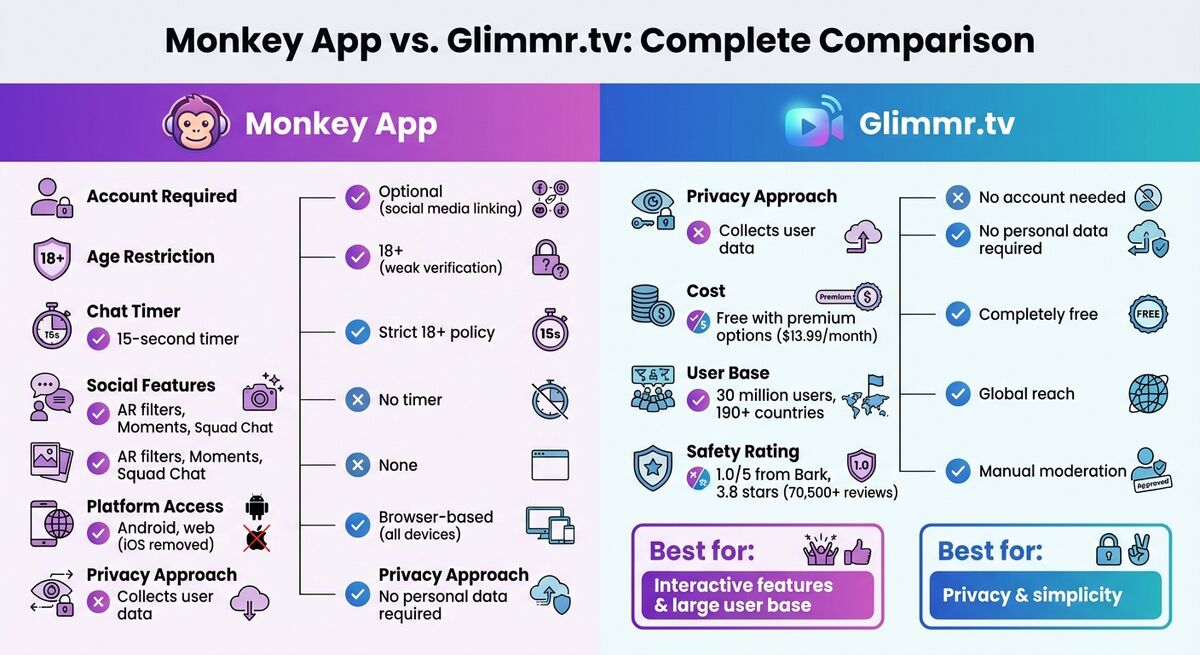
When comparing Monkey App and Glimr.tv, the primary distinction involves features versus privacy considerations. Monkey App delivers social media integration, gamified features, and premium upgrades appealing to rapid-fire interactive chats. However, it collects user data, presents privacy risks, and was removed from Apple App Store due to safety concerns.
Glimr.tv prioritizes simplicity and anonymity. It operates completely free, browser-based, requiring no accounts or personal information. Though lacking advanced features, it suits privacy-conscious users seeking straightforward video conversations.
Quick Comparison
| Feature | Monkey App | Glimr.tv |
|---|---|---|
| Account Required | Optional (social media linking) | No account needed |
| Age Restriction | 18+ (weak verification) | Strict 18+ policy |
| Chat Timer | 15-second timer | No timer |
| Social Features | AR filters, Moments, Squad Chat | None |
| Platform Access | Android, web (iOS removed) | Browser-based |
| Privacy Approach | Collects user data | No personal data required |
| Cost | Free with premium options ($13.99/month) | Completely free |
What Is Monkey App?
How Monkey App Works
Monkey App is a mobile-friendly video chat platform that debuted in Los Angeles in 2016 with over 30 million users globally. Its signature feature is a 15-second timer prompting users to extend the conversation via a "Time" button or skip to the next match.
The app employs an algorithm that considers shared interests—like music or gaming—alongside factors such as age and location. Beyond video chat, it offers Duo Video Chat, a swipe-based Cards interface, premium Knock Knock text chat, Moments for short video stories, and customizable profiles with mood and auto-playing song options. Users earn or purchase "Bananas" (in-app currency) unlocking extra features. The interface optimizes for quick mobile interactions.
Interface and Device Support
Designed for vertical one-handed mobile use, Monkey App distributes via Google Play Store (3.8-star rating from 70,500+ reviews). Apple App Store removed it due to safety concerns; iOS users access via mobile browsers. Though officially requiring 18+ users, its age verification system is weak, allowing younger users to slip through.
Who Uses Monkey App
The primary audience is Gen Z, particularly ages 17-24, enjoying fast-paced and spontaneous video chats. Marketed as "speed dating for friends," it attracts casual social connection seekers. It appeals to language learners and global interaction enthusiasts via international filters. Insufficient age verification means underage users sometimes access it despite the 18+ policy.
What Is Glimr.tv?
How Glimr.tv Works
Glimr.tv connects global users via instant, anonymous video chats—no accounts, no timers, no hassle. A single website click enables instant matching.
The platform emphasizes privacy: strict 18+ enforcement, no sign-ups, emails, or social media links required. Everything stays anonymous. It includes a reporting system for inappropriate behavior with active moderation supporting safer adult environments.
The design is simple, sleek, and works seamlessly on any device.
Interface and Device Support
Prioritizing straightforwardness, unlike the feature-heavy Monkey App, Glimr.tv focuses purely on instant video connections. The browser-based platform works effortlessly on desktops, laptops, tablets, and smartphones. It's compatible with Windows, Mac, iOS, and Android without downloads.
The minimalist interface centers the spotlight on video chat itself—no profile customization or virtual currency distractions. There's no learning curve: land on the site and chat within seconds. Being browser-based means no storage concerns or update requirements.
Who Uses Glimr.tv
Glimr.tv attracts adults valuing spontaneous and authentic interactions without the baggage of profiles or permanent identities. It targets casual global conversation seekers in safe, moderated environments. It especially appeals to those wary of social media-linked app data collection practices.
Feature Comparison
Side-by-Side Feature Comparison
Monkey App and Glimr.tv serve distinct preferences through contrasting features. Monkey App emphasizes gamified, social dynamics; Glimr.tv maintains straightforward one-on-one video chat.
Conversation Timing Difference: Monkey App uses a 15-second timer that urges users to make quick decisions. Extending requires tapping "Time"; otherwise you're automatically connected to a stranger. Glimr.tv omits timers, allowing chats to flow naturally for as long as both participants wish to stay connected, highlighting differing experience approaches—fast-paced and dynamic versus relaxed and uninterrupted.
Social Features: Monkey App features a swipe-based "Cards" interface, "Moments" for sharing updates, and "Squad Chat" for group interactions. Glimr.tv maintains simplicity, focusing purely on one-on-one video without social networking integration.
Safety Approaches: Monkey App uses machine learning and AI to flag sexual content or any violations of its community guidelines. Users report inappropriate behavior via a police emoji icon connecting to 24/7 moderation. Glimr.tv relies on manual moderation and reporting systems, skipping the AI layer.
| Feature | Monkey App | Glimr.tv |
|---|---|---|
| Account Required | Optional (one-tap start available) | No account needed |
| Age Restriction | Not specified | Strictly 18+ |
| Chat Timer | 15-second timer with extension option | No timer—chat until disconnect |
| Social Features | Cards, Moments, Squad Chat | None—video chat only |
| Matching Type | Random matching | Instant matching |
| AI Moderation | Enabled (detects sexual content) | Manual moderation |
| Platform Access | Web + Android (iOS removed) | Browser-based—all devices |
| Privacy Approach | Optional sign-up and profile creation | Fully anonymous, no sign-ups |
User Experience and Interface
Navigation and Ease of Use
Monkey App adopts a layout similar to popular social media platforms like TikTok and Instagram. The design revolves around swipe gestures and one-tap matching enabling easy video chat access. Users sign in via Snapchat, TikTok, Google, or Facebook accounts. The interface splits into two primary screens: one for chat history and messages, another for starting new video chats. This layered design contrasts sharply with Glimr.tv's stripped-down approach.
Glimr.tv keeps simplicity paramount. No account creation or profile management required. Users visit the website, enable camera and microphone, and receive instant pairing. Browser-based setup ensures device compatibility without downloads.
Monkey App's gamified features—the 15-second timer and social elements—create a fast and spontaneous vibe. However, Android users reported occasional app crashes interrupting experiences.
Accessibility Features
Both platforms prioritize simplicity but leave accessibility improvements unexplored. Users with disabilities or video-averse preferences face limitations—both require camera and microphone access. Monkey App's rapid 15-second timer can be challenging for users who need more time to respond or communicate.
Glimr.tv's browser-based design excels accessibility-wise: works on any device with a web browser, eliminating app download hassles. Monkey App's restricted app store availability forces some users to seek alternative download methods—an inconvenient solution.
Safety, Privacy, and Moderation
Privacy Features
Monkey App signup requires personal details such as name, date of birth, gender, phone number, and profile photos. The app tracks IP address, browser type, device details, and even an estimated location, which is visible to other users. Mandatory account linking through Google, Facebook, or Apple ID further reduces user anonymity.
The privacy policy permits the platform to use any shared content—whether photos, videos, or messages—for purposes like advertising. Account deletion isn't immediate and can take up to 30 days to process.
Glimr.tv adopts a more privacy-conscious approach. No account creation, personal data provision, or profile management is necessary. Users visit the site, activate camera and microphone, and start chatting. This setup significantly reduces the risk of exposing personal information, though the simplicity highlights the balance between anonymity and personalized features.
Moderation and Reporting Tools
Both platforms employ moderation with differing methodologies.
Monkey App combines machine learning with a 24/7 human moderation team to monitor and address explicit content. Live chat users report inappropriate behavior via a "police emoji" icon. The 15-second countdown timer at match start allows users to skip connections before engaging further.
However, moderation proves more reactive than preventative. Much of the moderation is in response to rule-breaking rather than prevention. Despite efforts, 2% of user reviews mention unwanted advances, and testers encountered explicit content within 30 seconds. Protect Young Eyes called the platform "extremely dangerous" for minors.
Glimr.tv includes a reporting system addressing violations with active moderation ensuring user safety. Both enforce 18+ requirements, though enforcement strategies differ. Glimr.tv's no-account model significantly reduces personal data exposure risks, though it potentially challenges age verification.
Pricing and Accessibility
Free vs. Premium Features
Monkey App operates a freemium model. Basic chats are free; premium features require a subscription. The free version provides 15-second video pairings, capped at about 10 minutes per day unless you extend it by watching ads. Monkey Plus subscription removes time limits, eliminates ads, and unlocks advanced filters. "Bananas" (in-app currency) enable extra customization. Some paid subscribers reported technical issues post-purchase.
Glimr.tv remains completely free. No hidden costs, ads, or premium tiers—users get unlimited, ad-free chats right from the start.
Device and Geographic Availability
Monkey App operates on web browsers and Android via Google Play Store. It's no longer available on Apple App Store due to safety concerns; iOS users rely on mobile web versions. Despite this, it connects users across 200+ countries.
Glimr.tv works instantly on any modern browser device. No downloads or registrations required, ensuring universal accessibility.
These differences reflect each platform's convenience and user priority approaches.
Strengths and Weaknesses
Pros and Cons Comparison
Monkey App Strengths:
- Snapchat/TikTok integration
- AR filters and emoji reactions
- Duo mode
- Interest-based matching
- 15-second timer creating fast, dynamic interactions
- Large user base (30 million+)
Monkey App Weaknesses:
- Collects extensive user data (IP addresses, device IDs, birth dates) while claiming content rights for advertising
- Data lacks encryption; approximate user locations display unless VPN used
- Safety experts rate it poorly (Bark: 1.0/5 rating; Protect Young Eyes warns about minor risks)
- Despite 18+ policy, weak age verification enabling easy bypassing
- Reports frequently mention explicit content exposure—sometimes within seconds
- ~2% of reviews highlight unsolicited sexual advances
- $13.99/month Monkey Plus subscribers often experience blocking shortly post-payment
- Removed from Apple App Store
Glimr.tv Strengths:
- Completely free with no ads, subscriptions, or hidden fees
- No registration requirement
- Browser-based, works on all devices
- Privacy-focused with no data collection
- Strict 18+ enforcement
Glimr.tv Weaknesses:
- Limited features compared to social-media-integrated platforms
- Smaller user base
| Platform | Strengths | Weaknesses | Best For |
|---|---|---|---|
| Monkey App | Social media linking, AR filters, interest-based matching, Duo mode, large user base | Heavy data collection, no encryption, location display, weak age verification, explicit content risks, technical issues with paid subscription, removed from Apple App Store | Users enjoying interactive features comfortable with privacy risks |
| Glimr.tv | Free, no ads, no registration, browser-based, privacy-focused | Limited features, smaller user base | Those prioritizing privacy, ease of use, zero cost |
Conclusion
Key Differences Recap
Monkey App combines social media elements with a 15-second timer for quick interactions. Features accompany serious trade-offs: extensive data collection and safety concerns. Despite its 18+ policy, the app struggles addressing issues, holding a 1.0/5 rating from Bark.
Glimr.tv offers a stripped-down approach, focusing on privacy, simplicity, and zero cost. No registration, ads, subscriptions, or unnecessary data collection—just the essentials. Open your browser and start chatting. Though lacking Monkey App's flashiness and user base size, it provides a no-frills, hassle-free experience designed for users valuing anonymity and ease of use.
Each platform serves different needs; your choice depends on your priorities.
Which Platform Should You Choose?
Drawn to dynamic, socially-driven interactions and unconcerned with privacy risks? Monkey App might appeal. Its 30 million users across 190+ countries create a large network of potential connections, though heavy data collection practices discourage privacy-conscious users.
Prioritizing privacy and simplicity? Glimr.tv wins clearly. Completely free, requiring no personal information, and works instantly in modern browsers. Though lacking Monkey App's massive user base and interactive features, it delivers a clean, anonymous video chat experience without data harvesting or subscription fee concerns. For straightforward, uncomplicated video conversations, Glimr.tv represents the optimal choice.
FAQs
How does Glimr.tv protect user privacy compared to Monkey App?
Glimr.tv emphasizes user privacy through stricter moderation practices, implementing solid data protection protocols, and fostering a safe space for anonymous video chats. These measures minimize risks and maintain high privacy levels.
Monkey App faces criticism for lacking adequate age verification and safety features. This shortfall permits minor access and potential inappropriate content exposure. By focusing on privacy and safety, Glimr.tv distinguishes itself as a safer and more trustworthy choice for those prioritizing their online security.
What safety risks should I be aware of when using Monkey App?
Monkey App presents serious safety risks from its weak age verification system. Though intended for 18+ users, younger individuals easily bypass restrictions by entering false information, leaving them exposed to inappropriate or explicit content.
A major secondary issue is the risk of predatory behavior and harassment. The anonymous, fast-paced setup makes monitoring interactions incredibly difficult. This has sparked significant concerns about the safety of users, particularly minors.
Consider platforms with stronger privacy and safety protocols as better options.
What makes Glimr.tv a better option for users who value anonymity?
Glimr.tv stands out for privacy and anonymity seekers. Unlike platforms requiring account creation or service linking, Glimr.tv enables connecting without signing up, allowing you to jump right in without sharing personal details.
Glimr.tv enhances security by requiring suspicious users—like those accessing the platform through VPNs—to register before they can participate. This smart move helps discourage rule-breaking while still keeping the platform safe and private. For a truly anonymous and secure experience, Glimr.tv represents a solid choice.